
BERKAN
ASLAN
0%

The ultimate shortcut manager for macOS. Assign text snippets to any key combination and supercharge your productivity.
Version 1.5.0 · macOS 13.0 or later · Apple silicon & Intel
On first launch macOS will ask for Accessibility permission. Hotkey Alchemist needs it to watch for your key combinations and paste on your behalf — nothing else.
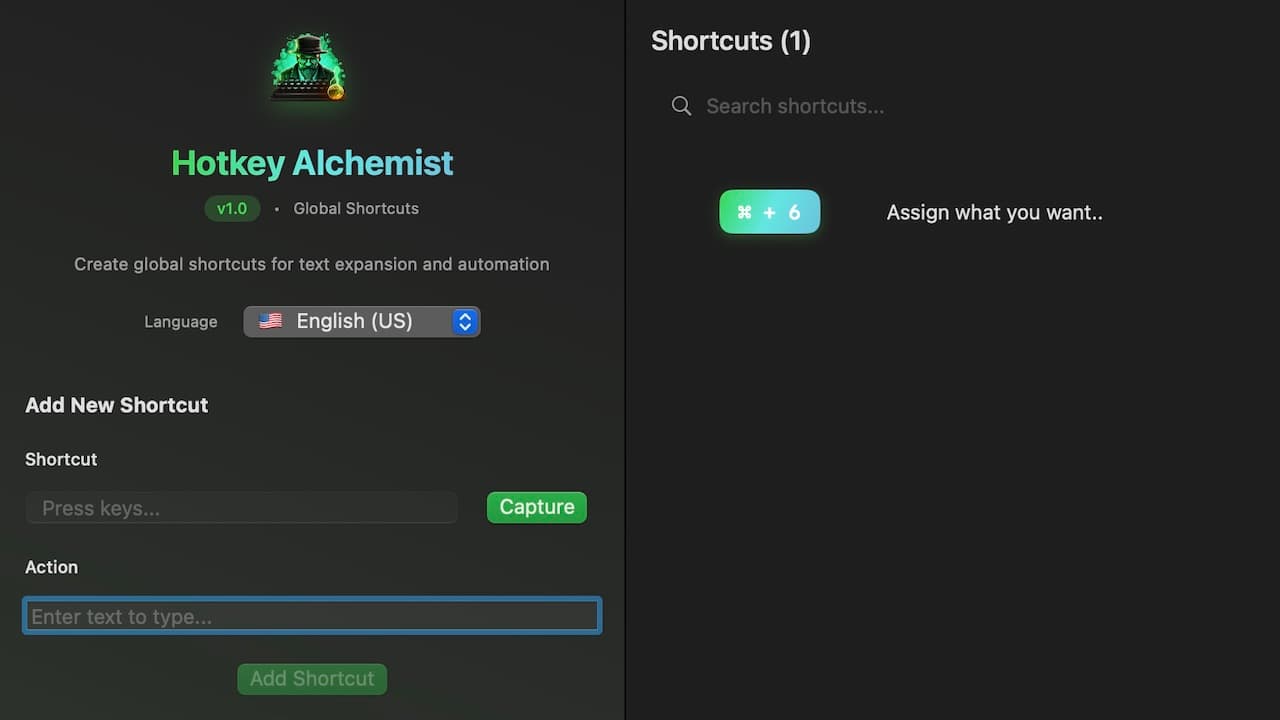
Hotkey Alchemist sits in the background with no window in your way. You teach it a combination once, and from then on that combination types for you in whatever app happens to be in front of you.
Press the combination
The app records the keys as you press them, so there is no list to scroll and no syntax to learn.
Write what it should paste
An email signature, a block of code, a command you can never remember — any text at all.
Use it anywhere
Mail, the terminal, a browser field, someone else's app. The shortcut works system-wide.
Shortcuts are registered with macOS itself rather than with one program, so the same combination fires whether you are in Xcode, Slack or a text field on a website.
You assign a shortcut by pressing it. The app reads the modifiers and the key straight from the event, which means what you press is exactly what gets bound.
Pasting borrows the clipboard for a fraction of a second and then puts back whatever you had copied. You never lose what you were holding onto.
No dock clutter and no window to manage. It launches, registers your shortcuts and stays quiet until you press one.
Shortcuts are saved locally on the machine. There is no account to create, no sync, and nothing leaves the computer.
The interface ships in three languages and you can switch between them inside the app at any time.